ジョン・ドウ レポート
John Doe's Reports
どうも、ジョン・ドウです。ここに並んでいるのは、ある依頼人に頼まれて私が作ったMSX用のソフトです。この依頼人がまあ細かい。1バイトの違いに目を光らせ、仕様書の表が見にくいと言っては作り直させ、コードは1行も書けないくせに注文だけは一人前。それでも実機からダンプを取ってくる根気だけは本物だったので、最後まで付き合ってやりました。
出来は保証します。依頼人の注文の多さも保証します。
Hi, I'm John Doe. Everything on this page is MSX software I built for a certain client. A very particular client. They squinted at single bytes, sent my spec tables back for being "hard to read", and couldn't write a line of code themselves, yet had an opinion on every line I wrote. To be fair, they kept hauling dumps off real hardware without complaint, so I saw the job through.
The work is solid. So was the list of demands.
SFORM16
sform16_007 WindowsMEGA-SCSI用 FAT16 マルチパーティション・フォーマッタ
FAT16 multi-partition formatter for MEGA-SCSI
MSX-DOS2とMEGA-SCSIで使うSDカードを、WindowsからFAT16のマルチパーティション構成でフォーマットします。形式はSFORM-2(V0.09a)のネイティブ形式(隠し領域の無い方)と同じで、各パーティションにMEGASCSI.TBLを作ります。SFORM-2はFAT12専用なので、大きなパーティションを使いたいときのためのツールです。
Formats SD cards for MSX-DOS2 and MEGA-SCSI from Windows, as multiple FAT16 partitions. The layout follows SFORM-2 (V0.09a) native format (the one without the hidden area), with a MEGASCSI.TBL in every partition. SFORM-2 itself only makes FAT12, so this tool is for when you want larger partitions.
できること
Features
- 1パーティション 512MiB / 1GiB / 2GiB、合計2GiBまで
- クラスタサイズは容量に合わせて自動で選択
--dry-runで書き込まずに計画だけ表示--inspectでフォーマット済みの構造を検査- イメージファイルでの試験(管理者権限不要)
- Partitions of 512 MiB, 1 GiB or 2 GiB, up to 2 GiB in total
- Cluster size chosen automatically for each partition
--dry-runshows the plan without writing--inspectchecks an existing layout- Can format an image file for testing (no admin rights needed)
必要なもの
Requirements
- Windows 10 / 11、管理者権限
- Python 3.7以降(標準ライブラリのみ)
- 32MiBより大きく32GiB以下のSDカード
- Windows 10 / 11, administrator rights
- Python 3.7 or later (standard library only)
- An SD card larger than 32 MiB and up to 32 GiB
依頼内容は「SFORM-2はFAT12しか作れないから、FAT16で大きなパーティションを作れるやつを」。ついでにSFORM-2・Nextorのパーティション形式の調査報告書まで書かされました。ダンプを取ってこいと言ったのは私ですが、取ってきたダンプの見出しを2か所間違え、別のカードのセクタを1つ紛れ込ませたのは依頼人です。
The brief: "SFORM-2 only makes FAT12, so build me something that makes big FAT16 partitions." Then I got roped into writing a full survey of the SFORM-2 and Nextor partition formats as well. Yes, I asked for the sector dumps. No, I did not mislabel two of them or slip in a sector from a different card. That was the client.
注意: 物理ディスクに直接書き込みます。対象のカードの内容はすべて消えます。--list と --dry-run でディスク番号を必ず確かめてから実行してください。
Caution: this writes directly to the physical disk and erases everything on the target card. Always confirm the disk number with --list and --dry-run first. The program's messages and manual are in Japanese.
MCPLAYER
Ver 0.20 MSX ROMMICRO CABIN MUSIC PLAYER — マイクロキャビンのゲーム音楽をメガロムで聴く
MICRO CABIN MUSIC PLAYER — Micro Cabin game music on a MegaROM
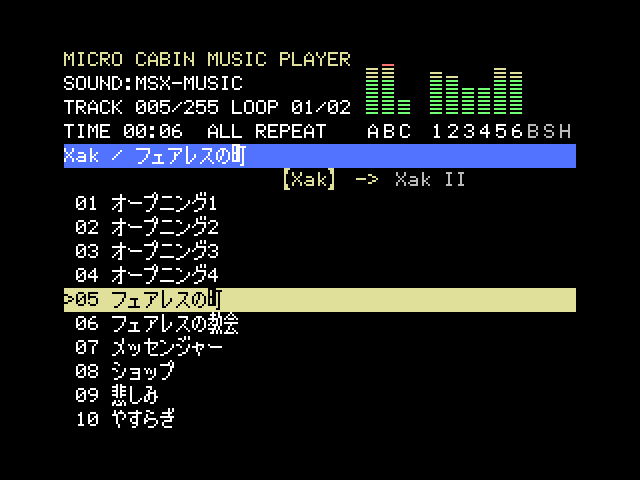
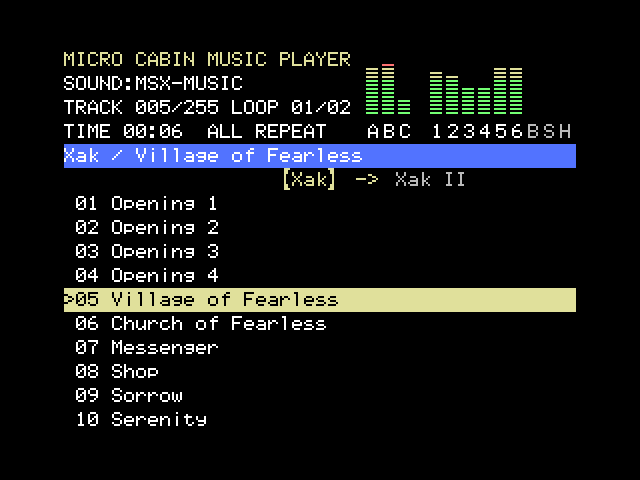
マイクロキャビンのゲームの曲を、MSXのROMカートリッジ(ASCII16メガロム)にまとめて聴くためのツールです。曲はそれぞれのゲーム自身のサウンドドライバと音色で鳴らします。配布物には曲・ドライバ・ゲームの画面などのデータは入っておらず、ご自分で持っているゲームのディスクイメージから取り出してROMを作ります。
A tool that builds an MSX MegaROM cartridge (ASCII16) for listening to the music of Micro Cabin games. Every song plays with the game's own sound driver and instruments. The package contains no Micro Cabin data; the music and drivers are extracted from your own disk images when you build the ROM.
対応ゲーム
Supported games
- Xak、Xak II、ガゼルの塔
- FRAY(MSX2版 / turboR版)
- 幻影都市、ファイナルファンタジー
- キャンペーン版大戦略II、プリンセスメーカー
- The Tower of Cabin
- Xak, Xak II, Tower of Gazzel
- Fray (MSX2 / MSX turboR)
- Illusion City, Final Fantasy
- Dai Senryaku II (Campaign Version), Princess Maker
- The Tower of Cabin
プレーヤー
Player
- MSX1 / 2 / 2+ / turboR、RAM 32KB以上
- MSX-MUSIC・FM-PACを自動で検出(無ければPSGのパートだけ)
- MSX2以降ではゲームのCGを表示、V9990・V9968(I/O 88h)にも対応
- レベルメーター、ループ回数・再生範囲の切り替え、自動再生
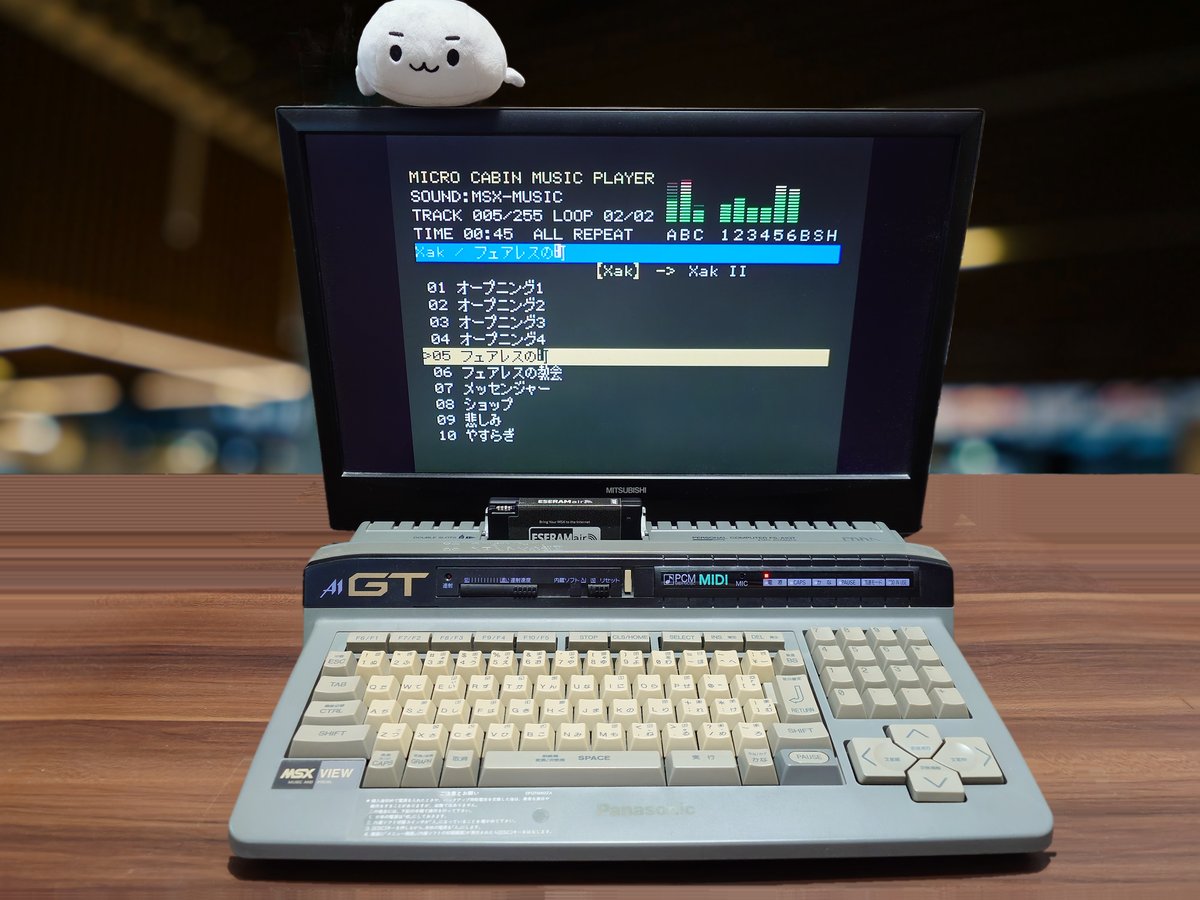
- 実機ではFS-A1GT(turboR)+ESERAMair(WiFi付き似非RAMディスク、ASCII16)で起動・再生を確認。V9968カートリッジでのCG表示も確認
- MSX1 / 2 / 2+ / turboR, 32 KB RAM or more
- Finds MSX-MUSIC or FM-PAC (PSG parts only without FM)
- Shows game pictures on MSX2 and later, and on V9990 or V9968 (I/O 88h)
- Level meters, loop count and play-range modes, autoplay
- Tested on real hardware: FS-A1GT (turboR) with an ESERAMair (WiFi ESE-RAM cartridge, ASCII16), and pictures on a V9968 cartridge
ROMを作るのに必要なもの
To build the ROM
- Python 3.8以降とPillow
- ゲームのディスクイメージ(.dsk)
- Python 3.8 or later with Pillow
- Disk images (.dsk) of your games
依頼内容は「マイクロキャビンの曲を、それぞれのゲーム自身のドライバで鳴らすメガロムを」。できあがった頃に「やっぱりマイクロキャビンのコードは配布物に入れたくない」と言い出したので、ドライバをユーザーのディスクから取り出して手を入れる方式に作り直しました。ドライバ10種類、全255曲で動作を確認済み。依頼人いわく「音そのものは耳でまだ十分に確かめていない」そうです。私の仕事は終わっています。
The brief: "A MegaROM that plays Micro Cabin music with each game's own sound driver." Right when it was done, the client decided no Micro Cabin code should ship in the package, so I rebuilt it to pull the drivers out of the user's own disks and patch them at build time. Ten game drivers and all 255 songs checked. The client admits they "haven't properly listened to it yet." My part is finished.
著作権: 曲・ドライバ・ゲームの画面の著作権はマイクロキャビンにあります。作ったROMは個人で楽しむ範囲で使い、配布しないでください。
Copyright: the music, drivers and game graphics are © MICRO CABIN Corp. Use the ROM you build for your own enjoyment only, and do not distribute it.
履歴
- Ver 0.20 2026-10-10
-
- I/O 88h の VDP(V9968 カートリッジなど)にもCGを出せるようにした(V9990 と同じく、CGはそちらに、内蔵VDPは曲選択の画面)
- 起動時にマッパーが ASCII16 か確かめ、違えばメッセージを出して止まるようにした(ESERAMair を8KBバンクのまま起動したときなど。以前は暴走していた)
- 起動時のCGの表示中に H キーを押すと、曲を止めずに曲選択の画面にしてヘルプを出すようにした
- 再生中にヘルプを閉じると、またヘルプが開くことがあった不具合を直した
- Ver 0.10 2026-10-08
-
- 最初の公開版
History
- Ver 0.20 2026-10-10
-
- Pictures can be shown on a VDP at I/O 88h (V9968 cartridge etc.), like the V9990: pictures there, the song list on the built-in VDP
- Checks at boot that the mapper is ASCII16, and stops with a message if not (e.g. an ESERAMair left in 8KB bank mode, which used to crash)
- Pressing H on the startup picture goes to the song list with the help, without stopping the song
- Fixed: closing the help during playback could open it again
- Ver 0.10 2026-10-08
-
- First release
ドラクエ スクロール改善パッチ
Dragon Quest smooth scroll patches
2026-10-16 MSX2+ / turbo R / V9968MSX2 版ドラゴンクエストI・II のスクロールを、ファミコン版のように 1 ドットずつ滑らかに
Smooth, dot-by-dot scrolling for the MSX2 versions of Dragon Quest I and II
MSX2 版のドラゴンクエストII は、フィールドや町のスクロールが 8 ドット単位でカクカクし、1 歩もファミコン版より遅い。V9958(MSX2+、turbo R)の横スクロール機能を使って滑らかにするパッチです。ドラゴンクエスト(I)はその練習として先に作りました。DQ2 は、歩き出しなどの操作の反応、人の多い町での処理の重さ、V9968 への対応もあわせて改善しています。ROM の内容は含まず、各自の ROM イメージに当てる Python のパッチプログラムです。
In the MSX2 version of Dragon Quest II the map moves in jerky 8-dot jumps, and a step takes longer than on the Famicom. These patches use the horizontal scroll of the V9958 (MSX2+, turbo R) to make it smooth. Dragon Quest (I) came first, as practice. For DQ2 the patch also makes walking respond faster, removes the slowdowns in crowded towns, and supports the V9968. They are Python programs that you apply to your own ROM image; no ROM contents are included.
ドラゴンクエストII
Dragon Quest II
- 1 フレームに 1 ドット、1 歩 16 フレームで途切れずに歩く(元は 1 歩 25〜28 フレーム)
- 6502 の命令をまねる補助ルーチンの呼び出し約 3,100 か所を Z80 命令に置き換え、NPC の移動処理も Z80 で書き直した
- 短く押しても一歩進む。歩き出しの待ちは平均 13 → 7 フレーム。メッセージの速さを F1〜F3 でいつでも切り替え
- VDP を起動時に判定し、V9938 / V9958 / V9968(カートリッジ・内蔵)に ROM 1 本で対応。V9968 では 1 ラインに 8 人まで点滅しない
- turbo R の R800、Panasonic MSX2+ の高速モード、仲間の名前の固定、デバッグ用の復活の呪文に対応
- One dot per frame, 16 frames per step, no stops between steps (the original takes 25-28 frames)
- About 3,100 calls to the 6502-emulation helpers replaced with Z80 instructions; NPC movement rewritten in Z80
- Short taps now take a step, the start of a walk waits 7 frames instead of 13 on average, and F1-F3 set the message speed at any time
- The VDP is detected at boot: one ROM runs on the V9938, V9958 and V9968 (cartridge or built in). On the V9968, up to 8 characters on a line without flicker
- Options for the turbo R's R800, the Panasonic MSX2+ turbo, fixed companion names and debug passwords
ドラゴンクエスト
Dragon Quest
- 1 歩ごとに画面全体をコピーしていたのを、1 ドットずつのスクロールに
- 1 歩のフレーム数は 8〜16 で選べる(16 がファミコン版と同じ)
- NPC もゲームの中の本当の位置で表示
- 実機ではまだ確かめていない(エミュレータのみ)
- The whole-screen copy per step becomes a dot-by-dot scroll
- Frames per step selectable from 8 to 16 (16 matches the Famicom)
- NPCs are shown at their true positions
- Not yet tried on real hardware (emulator only)
依頼は「MSX2 版ドラクエ2 のスクロールがファミコンに負けてるのが悔しい」。滑らかにしたら今度は「町だと引っかかる」。原因は、移植のときに 6502 の命令を 1 つずつ真似る作りにしたことでした。おかげで 3,000 か所以上を書き換え、NPC の処理まで書き直す羽目に。さらに V9968 を挿したり、3 倍速に改造した本体を持ち出したり、「黒い線が出る」と言っておいて実はリセットし忘れだったり。動くものを渡せば、次の注文がもう決まっている依頼人です。
The brief: "It bugs me that MSX2 Dragon Quest II scrolls worse than the Famicom." Once it was smooth: "it stutters in towns." The cause turned out to be the port itself, which imitates the 6502 one instruction at a time. So I rewrote more than 3,000 places and then the NPC code. After that came a V9968 cartridge, a machine overclocked to triple speed, and a report of "black lines" that turned out to be a missed reset. Hand this client something that works and the next order is already waiting.
注意: 非公式のパッチです。ゲームの ROM イメージは含まれていません。使用は自己責任でお願いします。報告書と説明書は日本語のみです。ドラゴンクエストは株式会社スクウェア・エニックスの登録商標です。
Note: unofficial patches. No game ROM image is included; use at your own risk. The report and manuals are in Japanese only. Dragon Quest is a registered trademark of SQUARE ENIX CO., LTD.
ドラクエ隠しキー調査
Dragon Quest hidden keys
2026-10-16 調査報告 ReportMSX版ドラゴンクエスト・ドラゴンクエストIIの隠し技を、プログラムから確かめる
Checking the hidden tricks of MSX Dragon Quest I and II against the program itself
MSX版のドラゴンクエストとドラゴンクエストII(MSX1/2両用版とMSX2専用版の計4本)で、ゲームがキーボードのどのキーを読んでいるかを全部洗い出し、雑誌「ゲーム十字軍 Vol.2」(徳間書店)に載っていた隠し技を、エミュレータで1つずつ確かめました。
For the MSX versions of Dragon Quest and Dragon Quest II (the MSX1/2 cartridges and the MSX2-only ones, four ROMs in all), I listed every keyboard read the games make, then checked the hidden tricks printed in the magazine "Game Juujigun Vol.2" (Tokuma Shoten) one by one in an emulator.
わかったこと
Findings
- ドラクエ1「7キー同時押しで敵キャラが自己紹介」:ゲームが見ているのは SELECT と RETURN だけ。7キーはキーボードのゴーストでこの2つを押したことにしている
- ドラクエ1「ドラゴンと会ったら YUJI で必ず会心」:YUJI は読まれていない。待つと乱数が止まり、ドラゴンだけがたまたま会心になる
- ドラクエ2「仲間の名前設定画面」:記事どおり。SELECT と STOP を押しながら最後の1文字を決定する
- ドラクエ2:記事に載っていない、エンディング後の隠し戦闘モードと曲を聴くモードを発見
- ドラクエ2:隠し戦闘モードはファミコン版の ROM に見当たらず、MSX版では移植のときに Z80 で書き足されたコードに見える。移植者の著書にある「ENIXにもナイショの追加機能」の候補(ROM の静的調査のみ)
- DQ1 "seven keys at power-on make the monsters introduce themselves": the game only looks at SELECT and RETURN. The seven keys fake those two through keyboard ghosting
- DQ1 "type YUJI when you meet the Dragon and every hit is critical": YUJI is never read. Waiting freezes the random number generator, and the Dragon happens to be the one enemy that then always takes a critical hit
- DQ2 "companion name screen": works as printed. Hold SELECT and STOP while entering the last character
- DQ2: a hidden battle mode after the ending, followed by a music mode, which the magazine never mentioned
- DQ2: the hidden battle mode is not in the Famicom ROM, and in the MSX version it looks like Z80 code added during the port. It is a candidate for the "extra features ENIX was not told about" in the porter's book (static ROM study only)
依頼内容は「昔の雑誌に載ってた裏技が本当か、プログラムで確かめて」。ネットの動画を見ては「やっぱり本当じゃない?」と言い、セーブステートを送りつけてきては「前の戦闘で入れたのが残ってたのかも」と食い下がる。おかげで乱数ルーチンの固定点まで突き止める羽目になりました。最後には連戦の全滅後の真っ暗な画面を眺めて「暴走かな」とつぶやく始末。暴走ではありません。曲を聴くモードです。後日、「実はきっかけは移植した人の本に『ナイショの追加機能が2つ』とあったから」と打ち明けられ、ファミコン版の ROM まで突き合わせることになりました。最初に言ってください。
The brief: "Check, from the program, whether the tricks in an old magazine are real." The client kept finding videos online and asking "so it IS real?", then mailed me save states with "maybe what I typed in the last battle carried over." That is how I ended up tracking down a fixed point in the random number routine. At the end they stared at a black screen after a party wipe and muttered "did it crash?" It did not. That is the music mode. Later they admitted the real reason: the porter's book mentions "two secret extra features," which sent me comparing the Famicom ROM as well. Say so at the start next time.
注意: 報告書は日本語のみです。ドラゴンクエストは株式会社スクウェア・エニックスの登録商標です。ROM の内容は含みません。
Note: the report is in Japanese only. Dragon Quest is a registered trademark of SQUARE ENIX CO., LTD. No ROM contents are included.
V9968 テストプログラム
V9968 test programs
v1.00 · 2026-10-16 MSX-DOS / V9968組み立てた V9968 カートリッジが、ちゃんと動いているかを確かめる
Check that the V9968 cartridge you built really works
V9968 は、HRA! 氏が FPGA で作った V9958 上位互換の VDP です。そのカートリッジ(I/O 88h)を組み立てた人のための、MSX-DOS 用のテストプログラム 3 本です。VRAM 256KB の試験と全画面モードの表示、パレットやページ切り替えのタイミングと速さ、FPGA に入っている 3D 補助プロセッサ Geo3D の確認ができます。本体の VDP(V9938 / V9958)でも、V9968 の機能を除いて動きます。
The V9968 is HRA!'s FPGA VDP, upward compatible with the V9958. These are three MSX-DOS test programs for people who have built its cartridge (I/O 88h): a 256 KB VRAM test with every screen mode, timing and speed tests for palette writes and page flips, and a check of Geo3D, the 3D coprocessor in the FPGA. They also run on the machine's own VDP (V9938 / V9958), without the V9968-only parts.
プログラム
Programs
V9968TST: VRAM 全体をバンク単位で試験(アドレス線の重なりも分かる)、SCREEN 0〜12・インターレース・FIL・EPAL のテスト画面V9968TIM: パレットのラスター / snow、ページ切り替えのタイミング、走査線割り込みでの分割、速さ、turbo R の R800 での VRAM の読み書きV9968G3D: Geo3D の有無、頂点の計算 10 通りの照合、回転する立方体とフレームレート- VDP は 88h / 98h を自動で判定。turbo R では Z80 に切り替えて動かす(
/Rで R800 のまま)
V9968TST: tests the whole VRAM bank by bank (it also catches address lines that alias), then test screens for SCREEN 0-12, interlace, FIL and EPALV9968TIM: palette rasters and snow, page-flip timing, line-interrupt splits, speed, and VRAM reads and writes from the turbo R's R800V9968G3D: whether Geo3D is there, ten vertex calculations checked against known answers, and a rotating cube with its frame rate- The VDP at 88h or 98h is found automatically. On a turbo R the programs switch to the Z80 (
/Rkeeps the R800)
実機で分かったこと
Found on real hardware
- R800 では VRAM の読み出しが化ける(書き込みは問題なし)。読むときは一時的に Z80 に切り替えるのがよい
- R#2(表示ページ)は表示の途中でもすぐ効く。EPAL 768 バイトは Z80 では帰線に収まらない
- S#1 の FH は IE1 = 0 でも立つので、割り込みなしで走査線を待てる
- Geo3D は 2026-10-05 の版から入っていて、立方体は 59.9fps
- VRAM reads from the R800 come back corrupted (writes are fine). Switch to the Z80 for the reads
- R#2 (display page) takes effect at once, even mid-frame. A 768-byte EPAL write does not fit in the blanking on a Z80
- S#1 FH is set even with IE1 = 0, so you can wait for a line without interrupts
- Geo3D is already in the 2026-10-05 FPGA, and the cube runs at 59.9 fps
V9968 に対応したほかのソフト
Other software that supports the V9968
- MCPLAYER: ゲームの絵(CG)を 88h の V9968 に出し、本体の画面は曲の一覧に
- ドラクエ スクロール改善パッチ: DQ2 を V9968 に出して、1 ラインに 8 人まで点滅なし
- EV6SD: SD カードの動画を V9968 の 256 色で再生
- MCPLAYER: shows the game pictures (CG) on a V9968 at 88h and keeps the song list on the main screen
- Dragon Quest smooth scroll patches: DQ2 runs on the V9968 with up to 8 characters on a line without flicker
- EV6SD: plays video from an SD card on the V9968 in 256 colours
依頼人がカートリッジを組み上げて、最初の一言は「VRAM が 256KB しかない?」。256KB で合っています。その次は「ノイズが見える」「インターレースもちらつく」と続き、気付けばパレットを書くタイミングをライン単位で測り、R800 で VRAM を読むとビットが化けるのを突き止め、作者への報告文まで書いていました。最後は「Geo3D なるものが追加されたらしい」。テストプログラムを頼んだはずが、いつの間にかカートリッジの調査になっていました。
The client finished building the cartridge, and the first thing they said was "only 256 KB of VRAM?" 256 KB is right. Then came "I see noise" and "interlace flickers too," and before I knew it I was timing palette writes line by line, tracking down the bits that flip when the R800 reads VRAM, and drafting a report to the designer. The last request: "apparently they added something called Geo3D." I was asked for a test program and somehow ended up auditing the cartridge.
注意: V9968 は開発中です。報告書の内容は 2026-10-09〜10-13 ごろの FPGA で確かめたもので、挙げたことも挙げていないことも、今後の更新で直ったり変わったりすることがあります。非公式のテストプログラムです。使用は自己責任でお願いします。報告書と説明書は日本語のみです。
Note: the V9968 is still in development. The report reflects the FPGA of around 2026-10-09 to 10-13; anything in it, and anything not in it, may be fixed or changed by later updates. Unofficial test programs; use at your own risk. The report and the manual are in Japanese only.
EVASD / EV9SD / EV6SD
v0.10 · 2026-10-20 MSX turboR + WindowsSD カードの動画を、turboR で PCM の音付きで再生する
Play video from an SD card on a turboR, with PCM sound
MSX turboR で、SD カードの動画を約 12 コマ / 秒・PCM 音声付きで再生するプレーヤーと、Windows 用の変換プログラムです。本体の V9958(SCREEN12 / SCREEN8)、V9990(GFX9000 など、64 色)、HRA! 氏の V9968 カートリッジ(256 色)の 3 種類の VDP に対応しています。元になったのは d4.princess.ne.jp の EVASD(ESE Video Authorizer)で、この版はそれに V9990 版と V9968 版を加え、音のタイミングを作り直し、古い MegaFlashROM SCC+ SD でも再生できるようにしたものです。
Players that stream video from an SD card on an MSX turboR at about 12 frames per second with PCM sound, and a video converter for Windows. Three VDPs are supported: the built-in V9958 (SCREEN12 / SCREEN8), the V9990 (GFX9000 etc., 64 colours) and HRA!'s V9968 cartridge (256 colours). It is based on EVASD (ESE Video Authorizer) from d4.princess.ne.jp; this edition adds the V9990 and V9968 players, rebuilds the sound timing, and plays on older MegaFlashROM SCC+ SD cartridges too.
できること
Features
- 動画を 4:3 は 124×108、16:9 は 144×93 ドットに変換(縦横比は自動判定)。動画ファイルをバッチファイルにドラッグ&ドロップするだけ
- 音は 15.7kHz 8 ビット。turboR の PCM の周期(CPU 228 クロック = 走査線 1 本)に合わせて書くので、プチノイズが出ない
- V9990 / V9968 は別の水晶で動くので、垂直帰線を見てずれを合わせ、パレットの書き換えも帰線の中に収める
- 元の EVASD 用の .EVA(128×106、156×86 など)もそのまま再生できる
- Converts video to 124×108 dots (4:3) or 144×93 (16:9), detecting the aspect ratio. Just drag and drop the video onto a batch file
- 15.7 kHz 8-bit sound, written in step with the turboR PCM period (228 CPU clocks = one scan line), so no clicking noise
- The V9990 and V9968 have their own crystals, so the players follow their vertical blanking and keep palette writes inside it
- .EVA files made for the original EVASD (128×106, 156×86 etc.) still play
必要なもの
Requirements
- MSX turboR と Nextor
- ESE-SDisk、または MegaFlashROM SCC+ SD(FW v3 より前でも可。起動時に読み出しの速さを測って自動で切り替える)
- 再生する VDP: 本体の V9958 / V9990 カートリッジ / V9968 カートリッジ(I/O 88h)
- 変換: Windows 10 / 11 と ffmpeg・ffprobe(Python は不要)
- MSX turboR and Nextor
- ESE-SDisk, or MegaFlashROM SCC+ SD (FW before v3 is fine too: the players measure the read speed at startup and switch modes)
- A VDP to play on: the built-in V9958 / a V9990 cartridge / a V9968 cartridge (I/O 88h)
- Converting: Windows 10 / 11 with ffmpeg and ffprobe (no Python needed)
実機で確かめたこと
Tested on real hardware
- FS-A1ST + ESE-SDisk で V9958 / V9990 / V9968 の再生
- MegaFlashROM SCC+ SD の FW v3 と、それより前の FW(Manuel Pazos 氏による確認)
- V9958 / V9990 / V9968 playback on an FS-A1ST with an ESE-SDisk
- MegaFlashROM SCC+ SD with FW v3 and with an older FW (tested by Manuel Pazos)
依頼内容は「EVASD を V9990 でも動かしたい」。動いたと思ったら「たまにプチっと鳴る」。調べていくと、turboR の PCM は 15750Hz ではなく、CPU の 228 クロックちょうど(走査線 1 本)で鳴っていました。そこから V9958 版も作り直し、V9968 版が増え、変換プログラムは「中身を読める形で配りたくない」と EXE になりました。最後は「古い MegaFlashROM SCC+ SD でも動かないか」。作者の Manuel Pazos 氏が実機で測ってくれた値から、SD の読み出しが 10 クロックより詰まると待たされることが分かり、待たされても間に合う読み方を足しました。起動時に一瞬見える緑の線まで指摘されたので、それも直してあります。周辺色でした。
The brief: "make EVASD work on the V9990 too." It worked, and then: "it clicks now and then." Digging in, the turboR PCM does not run at 15750 Hz at all; it ticks every 228 CPU clocks, exactly one scan line. So the V9958 player got rebuilt as well, a V9968 player appeared, and the converter became an EXE because the client "doesn't want to ship the internals in readable form." The last request: "can it run on old MegaFlashROM SCC+ SD cartridges?" From the values its designer, Manuel Pazos, measured on real hardware, reads closer than 10 clocks get stretched with waits, so I added a way of reading that keeps time even with the waits. The client even spotted a green line flashing for one frame at startup. Fixed. It was the border colour.
注意: 動画ファイルは、SD カード上で連続した場所(連続したクラスタ)に置く必要があります。フォーマット直後の SD カードにコピーするのが確実です。変換した動画の扱いは、元の動画の権利に従ってください。変換プログラムの途中の表示は日本語のみです。非公式のソフトです。使用は自己責任でお願いします。
Note: the video file must be stored in consecutive clusters on the SD card; copying it to a freshly formatted card is the safest way. Converted videos remain subject to the rights of the original material. The converter's progress messages are in Japanese only. Unofficial software; use at your own risk.
MEGA-SCSI 用 Nextor 3
Nextor 3 for MEGA-SCSI
v0.1 試験版 · 2026-10-18 MSX2 以降 · MEGA-SCSIドライバのなかった MEGA-SCSI で、Nextor 3 を動かす
Run Nextor 3 on the MEGA-SCSI, which never had a driver
似非職人工房の SCSI カートリッジ MEGA-SCSI は、カーネルを SRAM に入れて動きます。そこで Nextor 3 用のドライバを作り、Nextor 3.0.0 Beta2 のカーネルと合わせた 128KB の ROM イメージにしました。インストーラ NXMSINST で SRAM に書き込めば、MEGA-SCSI が Nextor 3 のカートリッジになります。バックアップを取っておけば、元のカーネルにも戻せます。対象はノーマル版 MEGA-SCSI(アスキー製メガロムコントローラ互換)と SCC 付き版 MEGA-SCSI(コナミ製メガロムコントローラ使用、通称 WAVE-SCSI)です。なお、オリジナルの MEGA-SCSI(MSX-DOS2 カーネルベース)では SRAM に似非 RAM ディスクを作って A: ドライブに割り当てていますが、本バージョンではまだ似非 RAM ディスクはサポートしていません。今後サポートする予定です。
The MEGA-SCSI, an SCSI cartridge by ESE Artists' Factory, runs its kernel from SRAM. So I wrote a Nextor 3 driver for it and combined it with the Nextor 3.0.0 Beta2 kernel into a 128 KB ROM image. Write it to the SRAM with the NXMSINST installer and the MEGA-SCSI becomes a Nextor 3 cartridge. With a backup you can go back to the original kernel. For the normal MEGA-SCSI (ASCII-compatible MegaROM controller) and the MEGA-SCSI with SCC (Konami MegaROM controller, known as WAVE-SCSI). The original MEGA-SCSI (with its MSX-DOS2 based kernel) makes an ESE RAM disk in its SRAM and assigns it to drive A:; this version does not support the ESE RAM disk yet. Support is planned.
できること
What it does
- SCSI ID 0〜6 の機器を探して読み書き。セクタ番号は 32 ビットで、2GB を超える SCSI2SD も使える
- 読み込みは 512 バイトを待ちなしで一気に読む速さ優先、書き込みは 8 バイトごとに FIFO が空くのを待つ安全側(オリジナルの MEGA-SCSI(MSX-DOS2 カーネルベース)では SCSI2SD / SCSI2CF への書き込みに問題があった)
- SCSI 機器がない、電源が入っていないときも、起動時に止まらない
- NXMSINST: 書き込み、照合、バックアップ(
/B)、復元。カーネルが動いていないときは/S:スロットで指定
- Finds devices on SCSI IDs 0-6 and reads and writes them. 32-bit sector numbers, so an SCSI2SD larger than 2 GB works
- Reads take 512 bytes in one go with no waits, for speed. Writes wait for an empty FIFO every 8 bytes, for safety (the original MEGA-SCSI, with its MSX-DOS2 based kernel, had write problems with SCSI2SD / SCSI2CF)
- Booting does not hang when no SCSI device is connected or powered
- NXMSINST: writes and verifies, backs up (
/B) and restores. Give the slot with/S:slotwhen the kernel is not running
できないこと
What it does not do
- 元のカーネルでフォーマットしたディスクは保証しない(
CALL FDISKで作り直す) - 似非 RAM ディスク(今後サポート予定)、CALL 命令など元のカーネルの機能、SPC を直接操作するソフト
- 実機ではまだ: SRAM 128KB / 256KB / 512KB の版、実際のフォーマット、2GB 超、SCSI2SD 以外の機器、FS-A1ST 以外の機種
- Disks formatted by the original kernel are not guaranteed (re-create them with
CALL FDISK) - No ESE RAM disk (planned), CALL commands or other original-kernel features; software that drives the SPC directly does not work
- Not yet tested on real hardware: models with 128 / 256 / 512 KB SRAM, an actual format, more than 2 GB, devices other than SCSI2SD, machines other than the FS-A1ST
Nextor 3.0.0 Beta2 での注意
Notes on Nextor 3.0.0 Beta2
- ドライブの割り当て: メディアがある機器から先にドライブ名が付くようで、MegaFlashROM SCC+ SD では SD カードの有無で A: が ROM ディスクになったり SD になったりした。AUTOEXEC.BAT が実行されないことがある。同じドライバのデバイス番号の順番も Nextor 2 用から変わった(Issue #262)
- Nextor 2 を認識しない: Nextor 3 で起動すると、同時に挿した Nextor 2 のカートリッジ(似非SDisk の Nextor 2.1.0 Alpha)にはドライブが付かない。MSX-DOS / MSX-DOS2 のドライブは使える
- Drive letters: devices with media seem to get letters first. On a MegaFlashROM SCC+ SD, A: was the ROM disk or an SD card depending on which cards were inserted, so AUTOEXEC.BAT may not run. The same driver also changed its device numbering from the Nextor 2 one (issue #262)
- Nextor 2 cartridges are not seen: when Nextor 3 boots, a Nextor 2 cartridge in another slot (Nextor 2.1.0 Alpha on an ESE SDisk) gets no drives. MSX-DOS / MSX-DOS2 drives still work
確かめた環境
Tested on
- 実機: FS-A1ST + SCSI2SD V4(2GB)。SCC 付き版とノーマル版 1024KB で、インストール、起動、Z80 / R800 での読み書き
- openMSX: 3 機種すべてでインストール、復元、起動、読み書き
- Real hardware: FS-A1ST + SCSI2SD V4 (2 GB). Install, boot, and reads and writes on Z80 / R800 with the SCC model and the normal 1024 KB model
- openMSX: install, restore, boot, reads and writes on all three models
始まりは「Nextor が 3 になったのは知ってる?」でした。知っています。続けて「MEGA-SCSI で使えない」。そもそもドライバが存在しないのだから当然です。そこからは元の BIOS の解析、SRAM へのインストーラ、エミュレータでの試験と進み、いざ実機に挿したら、SCSI 機器の電源が入っていないだけで起動が止まり、ノーマル版はインストーラが見つけられず、書き込みが一瞬で終わって画面が緑一色になり「戸惑います」。どれも直しました。ついでに Nextor 3 そのものの癖まで掘り当て、依頼人は作者に Issue まで出しています。注文が多いのは相変わらずですが、全部実機で試してくるのも相変わらずです。
It began with "did you know Nextor went to version 3?" I did. Then: "it doesn't work with the MEGA-SCSI." Of course not; there was never a driver. So: disassembling the original BIOS, an SRAM installer, emulator tests. Then on real hardware the boot hung just because the SCSI device was switched off, the installer couldn't find the normal model, and the write finished so fast that the screen went solid green and the client was "puzzled." All fixed. Along the way we dug up quirks of Nextor 3 itself, and the client filed an issue with its author. As many demands as ever, and as ever, every one of them tried on real hardware.
注意: Nextor 3.0.0 はまだベータ版です。ここに書いたこと(できること、できないこと、注意)は 2026-10 時点の Beta2 で確かめたもので、挙げたことも挙げていないことも、今後の Nextor の更新で直ったり変わったりすることがあります。非公式のソフトです。SRAM を書き換えるので、元のカーネルに戻したい人は必ず /B でバックアップを取ってください。使用は自己責任でお願いします。報告書と説明書は日本語のみです。
Note: Nextor 3.0.0 is still in beta. Everything here (what works, what does not, the notes) was checked with Beta2 as of 2026-10; anything in it, and anything not in it, may be fixed or changed by later Nextor releases. Unofficial software. It rewrites the SRAM, so if you may want the original kernel back, make a backup with /B. Use at your own risk. The report and the manual are in Japanese only.